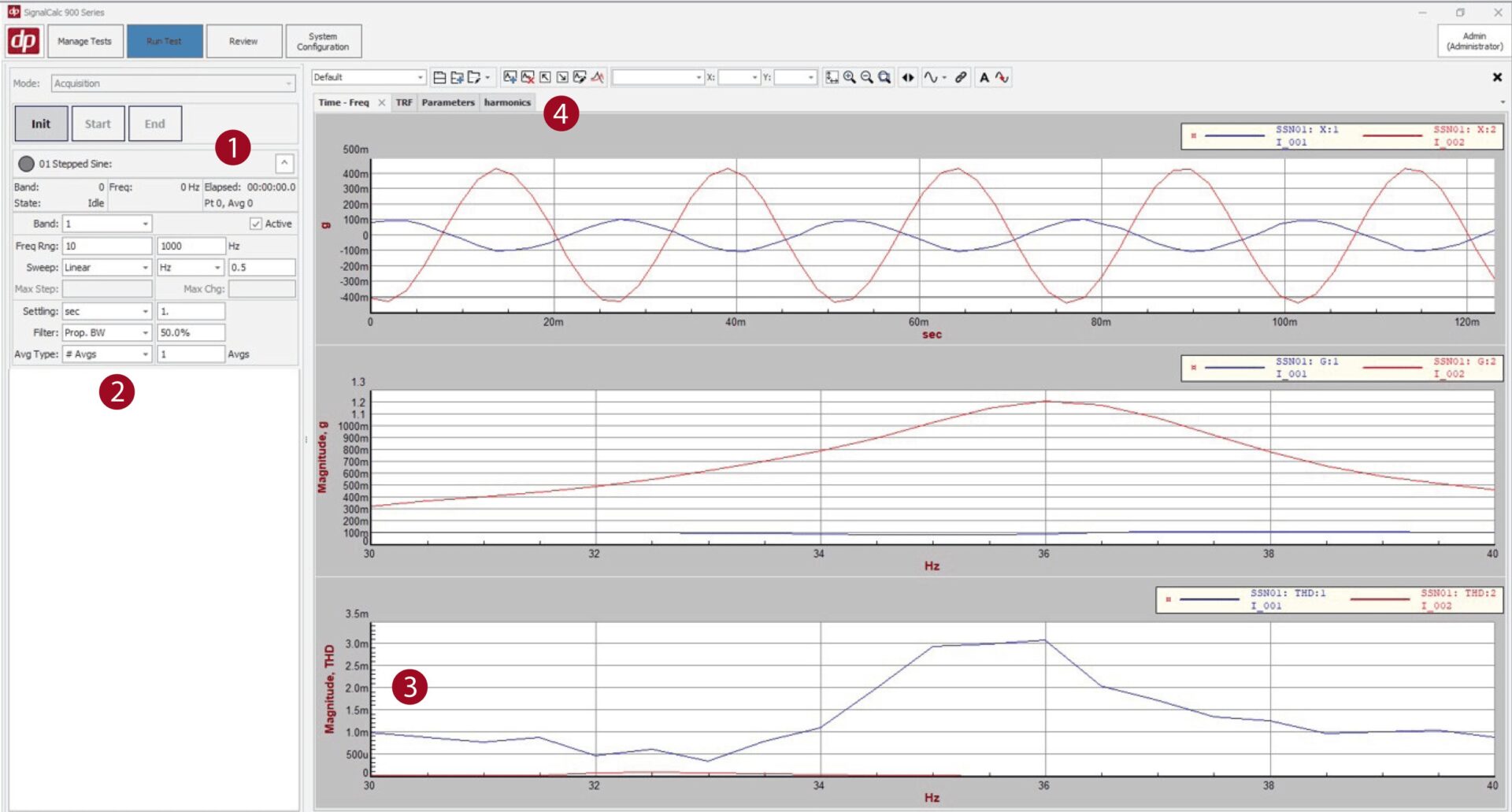
The Stepped Sine Analysis (SSN) option for the 900 series software offers the ability to accurately classify highly resonant, non-linear, or large dynamic range test articles response to sine excitation.
With open and closed loop control options, it’s an effective solution for sine testing cases with poor signal-to-noise.
Run schedule is divided into bands, each band is a series of dwells. Parameters can be independently adjusted for each band. Dwells have settling time and coherence checks before samples are averaged, ensuring data accuracy. Default outputs include transfer function and coherence with optional THD and harmonic spectrums.
When making assumptions about system response isn’t an option, Stepped Sine (SSN) testing provides accurate characterization for precise input conditions. Here reviewing with Multi-Select to shows how increasing test article excitation shifts the primary resonance frequency down and increases Q-factor
Transfer Function
Transfer Function (TRF) tests shown in blue give a quick overview of system response across a broad spectrum. Points of interest can be found rapidly by looking at transfer function magnitude, phase and coherence. Stepped Sine (SSN) tests shown in red give a detailed view of these points, capturing behaviors that sweeps and broadband excitation miss.
Flexible Test Setup
Control Options
Control open loop to drive level, or closed loop to response level, math channel or any combination
Settling Time
Allows test article realistic time to absorb energy, units of time or cycles
Harmonics Tracking
Sampling and plots update automatically with harmonic order parameter
Adjustable Dwell Bands
Linear or Logarithmic steps between dwells, multiple frequency resolution units, Custom Input Ranges, and more
Filtering, Averaging, and Coherence
Customize filter BW, number of averages, and minimum coherence requirements for each band
Unit Options
No limits on units for control channels, easily convert plots to compatible units.
Stepped Sine Measurements and Options
Transfer function and coherence
User selectable reference channel, no post processing or second measurement required
Harmonics and Distortion
Measure harmonic spectrum and THD live, no post processing
Input Range and Percentage
Plot the configured input range for each band and percent of range used to ensure no clipped signals
Parameter Tracking
Plot band parameters such as frequency resolution, settling time and measurement time for easy reporting
Step Direction
Configure the test to run from low to high or high to low
Min Coherence Channels
Set which channels are subject to the min coherence requirements of each band
Shows current bands settings, test status and remaining time. Control buttons also included.
2 Run Schedule Band parameters adjustable live during test
Allows user to adjust for changing test article responses and maintain test accuracy.
3 Optional THD measurement
Allows Total Harmonic Distortion to be measured without running a separate test or post-processing.
4 Preconfigured Graph pages
Transfer Function, Parameter Tracking and Harmonics Spectrum pages are automatically configured based on test setup to save time.
Watch the Tutorial Video
This Video Covers
Stepped vs swept sine tests – and when to use each.
How to set up a stepped sine test.
How to run a stepped sine test.
Get the Stepped Sine Data Sheet
SignalCalc Dynamic Signal Analyzers Literature Access
Please submit your contact information for access to the complete SignalCalc Dynamic Signal Analyzer literature library. Thank you!
Try the SignalCalc 900 Series Software for Free
Explore the power of the SignalCalc 900 Series software – with no hardware required. Run simulated tests, review results, and generate reports exactly as you would in a live environment.
Data Acquisition • Signal Analysis • Vibration Control