

The Latest SignalCalc 900 v3.2 Software Adds New Measurements and Enhancements – Elevating your Test and Measurement Performance
The 3.2 release incorporates Multi-Shaker Time Replication Control to the SignalCalc 900 Series.
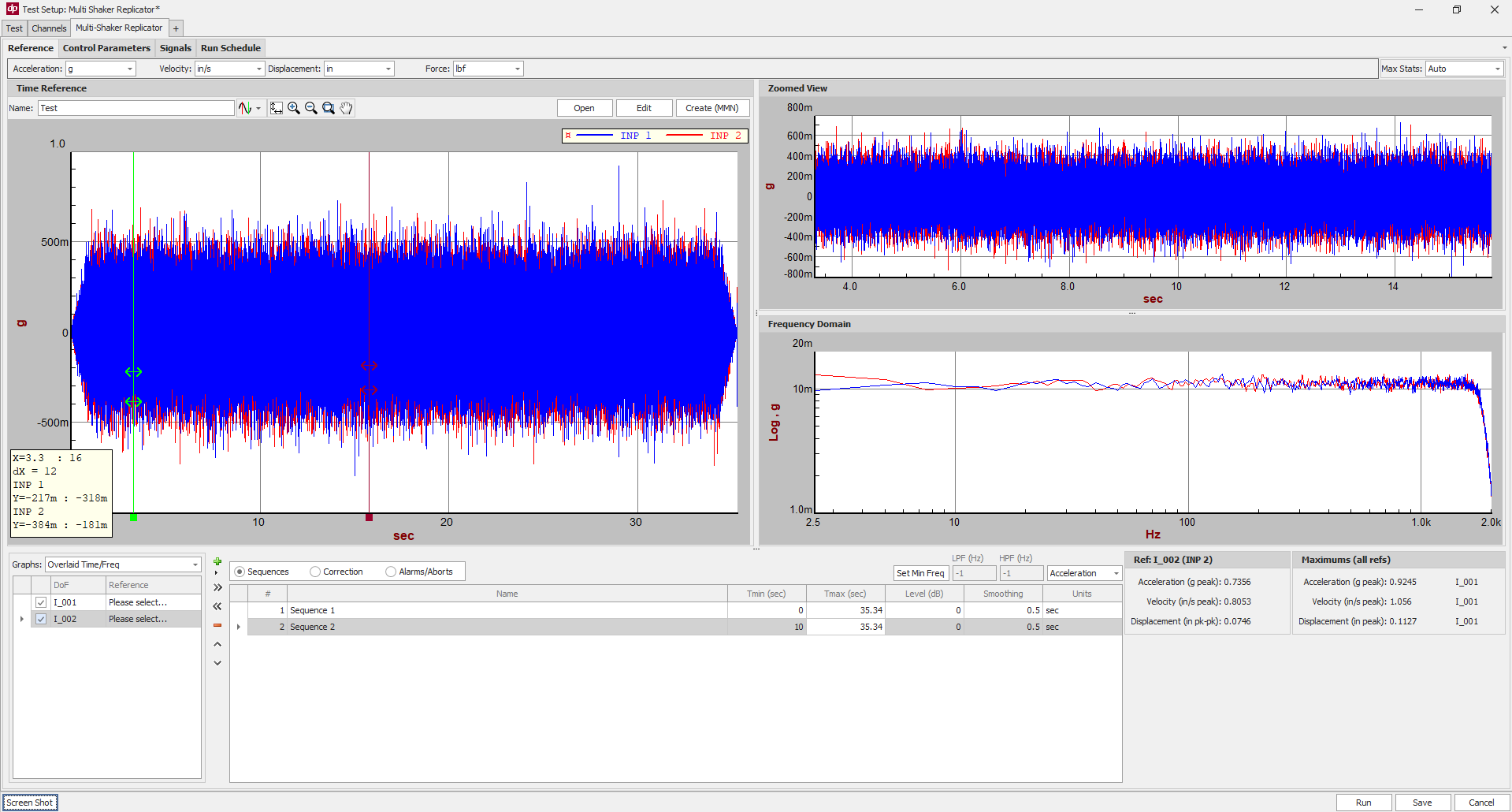
Multi-shaker time replication control is an advanced vibration testing technique used to reproduce complex, real-world motion on a test specimen. This process uses multiple shakers in a coordinated fashion to replicate time-history waveforms that were previously recorded in the field, on a test track, or during flight.
For the entire listing of notable enhancements, download the release notes PDF
Access the Comprehensive 3.2 Release Notes PDF
New Measurements
Multi-Shaker Time Replication Control
With Multi-Shaker Time Replication Control, you can control 2-24+ shakers oriented in any configuration. The shakers can be coupled together (connected to a single slip table or test article); oriented all in one axis; or in a multi-axis configuration. The control software provides the ability to specify a unique time history for each control channel as the reference profile and includes a graphical utility to modify/merge/filter/concatenate different time histories to be used as the reference profile.
The control software includes advanced control algorithms to handle overdetermined or underdetermined control. Like all modules which run on the 900 Series, the Multi-Shaker Replication Control users can now take advantage of the 900 Series features such as the Database, Math Channels, and Multiple Measurement capabilities as a part of their Replication test.
Applications and Use Cases
- Large and heavy test articles
- Multi-axis testing
- Replicating specific events
- Shock testing
New Features and Enhancements
1. Resonance Search and Dwell Improvements
- Improved abort detection when increasing the dwell level (less inadvertent Self check Timeout messages)
- The option to not clear data between consecutive dwells at the same frequency has been added; even in cases where Auto-Search After Sweep is used
- Improved Manual Controls during ramp-up of the resonance search sweep
2. Impact Hammer Testing Improvements
- In Transfer Function measurements (e.g., impact hammer) when a save on averages complete is set up and a stop occurs before completion, a save is now performed
- A global Save Number has been added when exporting data to external formats(e.g., MEscope), making it easier to track and organize exported data.
- Fixed an issue with point/direction incrementing when Resume is pressed in an Impact Hammer test
- Impact Hammer Testing template is updated. The new template defaults S1 (linear spectrum of hammer channel) to display in dB Mag and disables separate folder for export option

3. Improved Channels grid to easily view tri-axis or related channels
The ability to automatically group channels by sensor serial number was introduced in a previous release. In this update, we’ve added a “Starts With” checkbox, allowing the serial number field to match partial entries rather than requiring an exact match. For example, if a tri-axial sensor is labeled as abc123-X, abc123-Y, and abc123-Z for its three axes, the system will now recognize and highlight these related channels as a group.

4. Trigger Analyzer measurements based on the Date/Time
The ability to trigger a measurement at a specific date and time has been added to the SignalCalc 900 Suite. A PC can be left unattended with a measurement set to trigger at a specific time, to capture events which happen at odd hours or in hard-to-get-to places.
5. Additional Functions in the REST interface (REST API)
Several functions have been added to the REST API. These include:
- The ability to respond to the Pretest Report in a Controller test
- The ability to set the Multi-Ch Mode in a controller test
- The ability to execute an Application Sequencer script through the REST API
6. Calibration section added to Quick Report
A calibration section has been added to the Quick Report, which will display the calibration statuses of:
- The DP900 hardware used for the test
- The sensors used in the test, if they are entered in the Sensor Database
- Bridge Calibration results, if using bridge/strain sensors
7. Improvements to Sensor Database
The Sensor Database now has more fields, including a checkbox to enable ICP/IEPE on the sensor and a calibration due date. When a test is run with a Database sensor which is out of calibration, the software will notify the user.
8. Customizable Matlab time history exporting
Choose between exporting all channels to a single Matrix, each channel in its own vector, each channel to its own .mat file, or an auto-select based on the time history length. You can set this under Preferences -> Recording in the DP menu (top left).
9. Pretest Parameters Saved with Shaker Configuration
The Shaker configurations in the Outputs section of the Channels setup now has the ability to link Pretest parameters to a specific shaker. When using a single controller or a test database of tests between two shakers, Pretest parameters often need to be modified as they are usually specific to each shaker. This improvement minimizes the changes required to share a test profile database between two different shakers.